 Web Clipper
Web Clipper for Google Drive™
A Chrome extension that saves the text you select on any web page to your own Google Docs document, together with the page title, a link to the source and the date.
Add to ChromeWorks in Chrome on desktop. Requires a Google account.
On the web page
Sleep is not a passive state. During deep sleep the brain replays the day's events and moves them into long-term memory. This is why a full night matters before an exam.
In your document “Research notes”
During deep sleep the brain replays the day's events and moves them into long-term memory.
How memory works — Example Science · Oct 8, 2026, 10:42 AM
How it works
Install
Add the extension to Chrome and pin its icon next to the address bar.
Sign in
Click the icon and sign in with your Google account.
Create a document
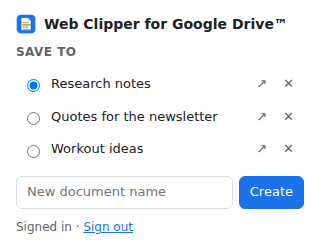
Name it in the extension window, for example “Research” or “Quotes”.
Clip
Select text on a page, right-click, choose Save to Google Drive and pick the document.
What you get
Clips land in your own documents
Each clip is added to the end of a regular Google Docs file in your Google Drive. Paragraphs stay as they were on the page.
The source is kept for you
Under every clip there is a small line with the page title linked to the page, plus the date and time.
A document per topic
Create as many documents as you need from the extension window and choose one in the right-click menu.
One click for the main one
Mark a document as default and a single menu click saves into it. With no documents yet, a document named “Web Clips” is created for you.
What access Web Clipper asks for, and why
Web Clipper has no server of its own. The text you save goes from your browser directly to Google. The extension asks for the smallest access that lets it do its job.
| Access | Why it is needed |
|---|---|
Google Drive: drive.file | To create Google Docs documents for your clips and add text to them. This access covers only the files the extension itself created. It cannot see, read or change any other file or folder in your Google Drive. |
Sign-in (identity) | To open the Google sign-in window so you can grant the access above. |
Right-click menu (contextMenus) | To show the “Save to Google Drive” item when you have selected text. |
Current tab (activeTab, scripting) | To read the text you selected, with its paragraph breaks, at the moment you click the menu item. The extension does not read pages at any other time. |
Storage (storage) | To remember your list of documents and which one is the default, and to keep you signed in. |
Details are in the Privacy Policy.
Questions
What does the extension see in my Google Drive?
Only the documents it created. Your other files and folders stay out of its reach.
Does it save images or whole pages?
No. It saves the text you select and where it came from.
Where is my text stored?
In your Google Drive, in documents that belong to you. Web Clipper keeps no copy.
How do I remove the extension's access?
Click Sign out in the extension window, or remove Web Clipper on the third-party connections page of your Google account. Your documents stay in your Drive.
What happens to a document I remove from the list?
It disappears from the extension's list only. The file itself stays in your Google Drive.